Practitioner Programme · Certification-Prep Edition
Fibre Access Network
Planning and Design
A rigorous, vendor-neutral course in planning and designing fibre-to-the-home networks — built to the depth of professional OSP-design programmes. It takes you from how light travels in glass all the way to designing, costing, building and testing a complete fibre access network.
Fifteen modules build on each other in a deliberate order — each one assumes only what came before. Work through them top to bottom, or jump to a topic from the sidebar.
How it works
What fibre optics is, how light is shared among homes (PON), and the network shapes (architecture) that make it affordable.
How to plan it
The OSP design process, choosing routes, and sizing capacity — turning a map of homes into an equipment plan.
How to design it
Splitter placement, the optical power budget, and where the active equipment sits — the core design skills.
Build & verify
Testing and handover, the business case, and the hardware catalogue that the design is built from.
Construct safely
Aerial and underground construction methods, safety, and the standards and documentation that govern the work.
Prove it
A 10-question mastery check on every module, an exam-domain map, and a timed mock certification exam (80% to pass).
Every module has plain-English explanations alongside the technical detail, hands-on simulators you can drive yourself, and a mastery check at the end. The interactive simulators — link budgets, splitter hierarchies, route reach, capacity and aerial sag — are where the real understanding forms, so use them rather than just reading. When you are ready, the Mock Exam tests every domain at once.
Module 1 is free and needs no account. The remaining modules, the simulators, the mock exam and the certificate unlock with a single one-off payment.
Optical foundations
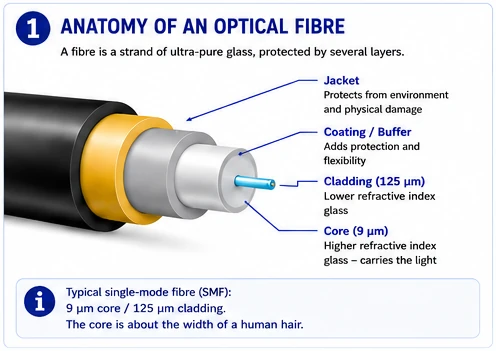
Fibre optics is the technology of sending information as pulses of light through a thin strand of glass, instead of as electrical signals through copper wire. It is the backbone of modern communications — the internet, phone calls and television all travel as light through fibre for most of their journey.
An optical fibre is a strand of extremely pure glass, roughly the thickness of a human hair. Information is sent by switching a light source on and off very fast — billions of times per second — so each flash and gap becomes the 1s and 0s of digital data. A light detector at the far end reads those flashes back into the original information. Because light travels enormous distances through clear glass with very little weakening, one fibre can carry vastly more information, much further, than a copper wire of the same size.
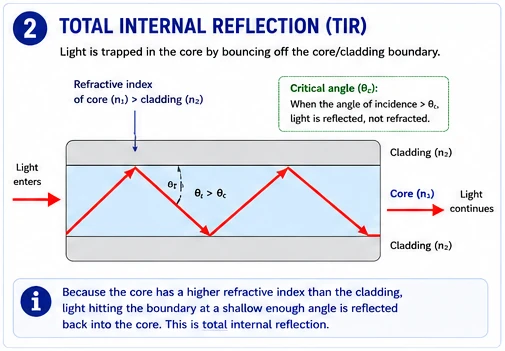
The clever part is how the light is kept inside the glass over many kilometres, even around bends. A fibre has two layers: an inner core and an outer cladding, made of glass with slightly different properties. When light tries to escape from the core into the cladding, it instead bounces back in — a phenomenon called total internal reflection. The light effectively ricochets down the core, staying trapped all the way to the far end.
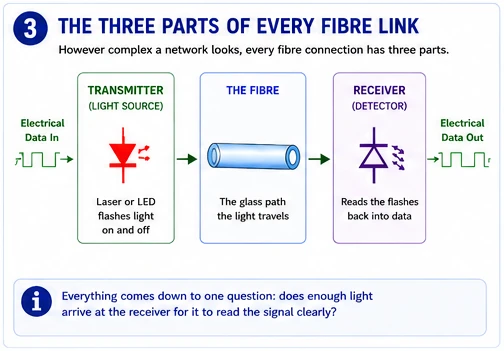
However complex a network looks, every fibre connection has the same three basic parts. Hold these in mind — the whole course is about getting light successfully from the first to the third.
| Part | What it does | Everyday comparison |
|---|---|---|
| Transmitter (light source) | A laser or LED that flashes light on/off to send data | The person speaking |
| The fibre | The glass path the light travels along | The telephone line carrying the voice |
| Receiver (detector) | Reads the arriving flashes back into data | The person listening |
Everything in fibre design comes down to one question: does enough light arrive at the receiver for it to read the signal clearly? If too much light is lost along the way, the receiver "can't hear" and the connection fails. To work that out, we first need a way to measure how much light there is and how much is lost — and that is what decibels give us.
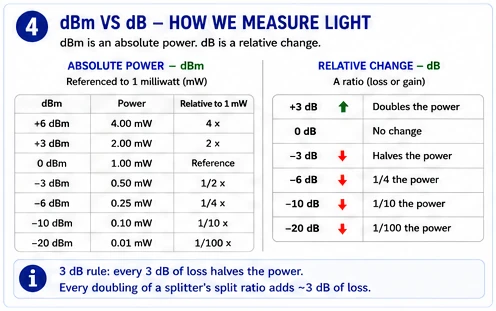
Optical design is bookkeeping in decibels. Get the units right and everything else follows; confuse them and every later calculation is wrong.
dBm is an absolute optical power, referenced to 1 milliwatt: 0 dBm = 1 mW, +3 dBm ≈ 2 mW, −3 dBm ≈ 0.5 mW. dB is a relative change — a ratio, i.e. a loss or gain with no absolute meaning on its own. The arithmetic that makes the decibel worth using: because it is logarithmic, you add and subtract dB values instead of multiplying ratios. A chain of losses is just a sum.
The 3 dB rule is worth committing to memory: every 3 dB of loss halves the optical power, and every doubling of a splitter's split ratio adds ~3 dB. That single fact lets you estimate a budget in your head before you ever open a calculator.
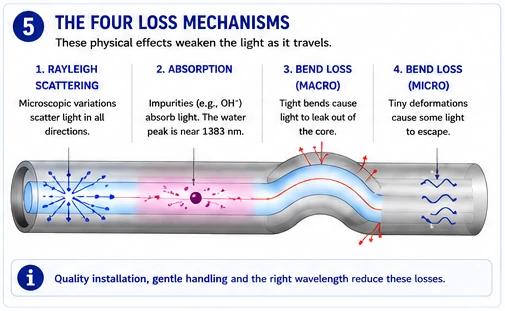
Light weakens in fibre through several distinct physical effects. A designer must know which dominate where.
| Mechanism | Cause | Where it bites |
|---|---|---|
| Rayleigh scattering | Light scatters off microscopic density variations in the glass; falls with the 4th power of wavelength | Sets the intrinsic floor; far worse at short wavelengths — the reason 1310 loses more than 1550 |
| Absorption | Residual impurities (notably the OH⁻ "water peak" near 1383 nm) absorb light | Creates the attenuation peaks; G.652.D low-water-peak fibre flattens this |
| Bend loss (macro) | Light escapes the core at tight bends | Slack storage, closures, sloops — 0.1–3 dB if radius too small |
| Bend loss (micro) | Tiny deformations from pressure/manufacturing | Poor cable handling, over-tight ties |
Attenuation vs dispersion — two different limits
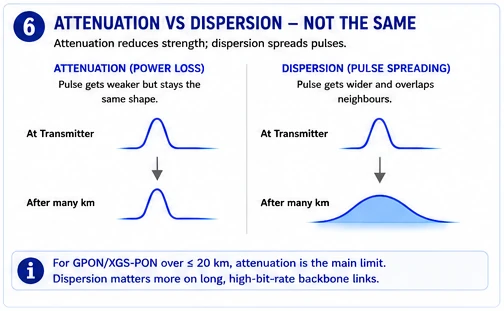
Attenuation limits how far light reaches before it is too faint to detect. Dispersion limits how fast you can signal: pulses spread out (chromatic dispersion from different wavelengths travelling at slightly different speeds; modal in multimode only) and eventually blur into each other. For PON access at GPON/XGS rates over ≤20 km, attenuation is the binding constraint. Dispersion becomes a real consideration on long, high-bit-rate transmission spans — which is why it matters more on a DWDM backbone than on a 12 km access PON.
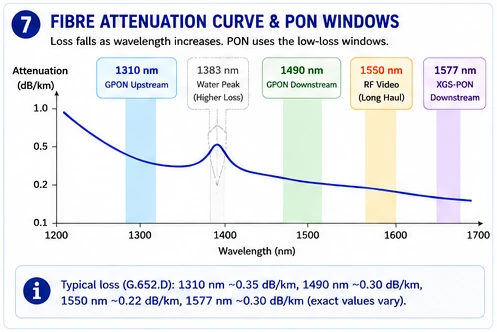
Plot loss against wavelength and three usable low-loss "windows" emerge. PON deliberately places its signals in them. Note the numbers — you will use these exact coefficients in Module 8.
| Wavelength | Typical loss (G.652.D) | PON use |
|---|---|---|
| 1310 nm | ~0.33–0.40 dB/km | GPON upstream (ONU→OLT) |
| 1490 nm | ~0.30 dB/km | GPON downstream (OLT→ONU) |
| 1550 nm | ~0.20–0.30 dB/km | RF video overlay; long-haul |
| 1577 nm | ~0.30 dB/km | XGS-PON downstream |
| 1383 nm | peak (legacy) / flat (G.652.D) | The "water peak" — avoided |
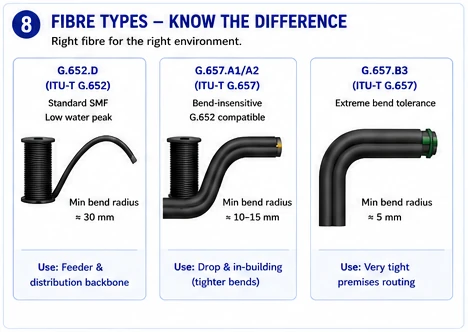
| Type | Standard | Character | Use |
|---|---|---|---|
| G.652.D | ITU-T G.652 | Standard SMF, low water peak | Feeder & distribution backbone |
| G.657.A1/A2 | ITU-T G.657 | Bend-insensitive, G.652-compatible | Drop & in-building (tight bends) |
| G.657.B3 | ITU-T G.657 | Extreme bend tolerance | Very tight premises routing |
Mastery check — Optical foundations
02 · PON technology & its evolution
This module is part of the full course. Module 1 is free so you can judge the depth and the teaching before you pay anything.
Already paid? Sign in with the email you used at checkout.
Also available: OTDR Usage & Trace Analysis, sold separately — or take both together and save.
03 · Network architecture & topology
This module is part of the full course. Module 1 is free so you can judge the depth and the teaching before you pay anything.
Already paid? Sign in with the email you used at checkout.
Also available: OTDR Usage & Trace Analysis, sold separately — or take both together and save.
04 · Outside-plant planning approach
This module is part of the full course. Module 1 is free so you can judge the depth and the teaching before you pay anything.
Already paid? Sign in with the email you used at checkout.
Also available: OTDR Usage & Trace Analysis, sold separately — or take both together and save.
05 · Route planning
This module is part of the full course. Module 1 is free so you can judge the depth and the teaching before you pay anything.
Already paid? Sign in with the email you used at checkout.
Also available: OTDR Usage & Trace Analysis, sold separately — or take both together and save.
06 · Capacity planning
This module is part of the full course. Module 1 is free so you can judge the depth and the teaching before you pay anything.
Already paid? Sign in with the email you used at checkout.
Also available: OTDR Usage & Trace Analysis, sold separately — or take both together and save.
07 · Splitter placement & split-ratio design
This module is part of the full course. Module 1 is free so you can judge the depth and the teaching before you pay anything.
Already paid? Sign in with the email you used at checkout.
Also available: OTDR Usage & Trace Analysis, sold separately — or take both together and save.
08 · The optical power link budget
This module is part of the full course. Module 1 is free so you can judge the depth and the teaching before you pay anything.
Already paid? Sign in with the email you used at checkout.
Also available: OTDR Usage & Trace Analysis, sold separately — or take both together and save.
09 · Active device placement & the central office
This module is part of the full course. Module 1 is free so you can judge the depth and the teaching before you pay anything.
Already paid? Sign in with the email you used at checkout.
Also available: OTDR Usage & Trace Analysis, sold separately — or take both together and save.
10 · Validation, testing & handover
This module is part of the full course. Module 1 is free so you can judge the depth and the teaching before you pay anything.
Already paid? Sign in with the email you used at checkout.
Also available: OTDR Usage & Trace Analysis, sold separately — or take both together and save.
11 · FTTx business case & economics
This module is part of the full course. Module 1 is free so you can judge the depth and the teaching before you pay anything.
Already paid? Sign in with the email you used at checkout.
Also available: OTDR Usage & Trace Analysis, sold separately — or take both together and save.
12 · Components & hardware
This module is part of the full course. Module 1 is free so you can judge the depth and the teaching before you pay anything.
Already paid? Sign in with the email you used at checkout.
Also available: OTDR Usage & Trace Analysis, sold separately — or take both together and save.
13 · Construction & installation methods
This module is part of the full course. Module 1 is free so you can judge the depth and the teaching before you pay anything.
Already paid? Sign in with the email you used at checkout.
Also available: OTDR Usage & Trace Analysis, sold separately — or take both together and save.
14 · Safety
This module is part of the full course. Module 1 is free so you can judge the depth and the teaching before you pay anything.
Already paid? Sign in with the email you used at checkout.
Also available: OTDR Usage & Trace Analysis, sold separately — or take both together and save.
15 · Standards & documentation
This module is part of the full course. Module 1 is free so you can judge the depth and the teaching before you pay anything.
Already paid? Sign in with the email you used at checkout.
Also available: OTDR Usage & Trace Analysis, sold separately — or take both together and save.
REF · Component reference
This module is part of the full course. Module 1 is free so you can judge the depth and the teaching before you pay anything.
Already paid? Sign in with the email you used at checkout.
Also available: OTDR Usage & Trace Analysis, sold separately — or take both together and save.
Exam map
How each module maps to the knowledge domains the recognised certification bodies examine, so you know where you stand before you sit one.
Already paid? Sign in with the email you used at checkout.
Also available: OTDR Usage & Trace Analysis, sold separately — or take both together and save.
Mock exam
A timed paper across every domain, marked instantly with explanations. Score 80% or above and your certificate is issued automatically.
Already paid? Sign in with the email you used at checkout.
Also available: OTDR Usage & Trace Analysis, sold separately — or take both together and save.